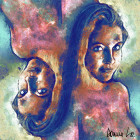
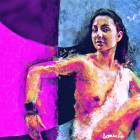
Hey everyone! I`ve (finally) done a tutorial. It’s for the piece of art ’Envy’. I`ll try to explain some things – how I do my work in the program ’Paint Shop Pro 7’. I think the greater part of you draw in Photoshop. But I think it’s a similar program. So, here we go!
First I draw a rough sketch on a piece of paper. I usually draw with an ordinary HB pencil. I scan the picture and throw it in the program. Here’s the sketch…

Make a new layer (raster), set to Multiply mode. Then I start doing the lineout. I do it with the ’Freehand’ tool set to “point to point” (the picture of a lasso). Photoshop equivilant tool is Polygonal Lasso. I fill the outline with the ’Airbrush’ tool – colour black. This is how it looks like:

Do the outline in a variety of thicknesses to give it a more 3D feeling.
When the outline is complete open another layer (Multiply mode) for coloring. First throw on the base color you want – in my case – for the skin.
Just paint over the lineout. Because it`s in another layer you won`t color it over. As you can see I already did some shading on the top of her head. Again use the ’freehand’ tool to select where you want to shade and click on: colors – adjust – brightness/contrast and adjust the brightness to -20 and the contrast to 0! (Photoshop equivilant Image > Adjustments > Brightness & Contrast). You`ll get a darker spot. I did this three times as you can see.
I use three ways to shade and highlight something, but that`s coming up later. Just enjoy the ride…

OK, the shade is too hard, so we`ve got to soften it up a little. I do this by using the smudge tool. Retouch tool – retouch mode – smudge. Play with the tool around a little bit so you`ll see what size, opacity, hardness, step and density you need :).
Don’t worry, practise makes perfect. Alright, I did some more shadows and i smudged everything. It looks like this…

The cheek-bone is still a bit out of place!
Too Michael Jackson style. We`ll fix that later. I noticed it later on 😛
HINT: Don`t smudge too much. It will look to soft and unnatural…
Let`s move on! Shade & smudge the nose and color the lips. Do it! 🙂

And now – ladies and gentlemen – THE HIGHLIGHTS! Hehe – sorry – I couldn`t help myself. (do you write »myself« together or separate? Nevermind…)
I do the highlights with the same tool I smudge! The ’retouch’ tool. Only the retouch mode is set to »lighten RGB. Figures… Again I can’t tell you the exact size, hardnes, bla bla bla. You have to try it – how it fits you. OK! I’ve done that! Here it is…

HINT: Again, don`t overdo it, don`t highlight too much. And offcourse! Highlight on the places that need to be highlighted – same with shadows.
My second technique to do shadows: I dont choose the lighten RGB in choose the darken RGB! It works the same way how you do highlights. I shadowed her neck that way.

Alright, the neck is done. And now, my favorite part –THE EYE! I love eyes – so small and yet full of details and character.
I cleaned out the pencil doodles and I drew two lines with the airbrush. Above and under the eye. Folowing: Some highlights here some shadows there 🙂 As shown in the picture.

Do a circle with the freehand tool and paint it with the airbrush. I darkened the outer line of ehe circle. Paint the cornea white, but you have to shadow it in the corners to do that 3D feeling again. Because it`s round, not flat.

Let`s continue. The eyeball…
Do the eyeball with the airbrush – it`s perfectly round. And a small reflection. It`s made of three circles – the one in the middle has the highest hardness and the two on the sides havew lower hardness. Hope you know what i mean. The two circles are put over the one in the middle, so it looks more blurry.

I darkened the upper side of the green. Using the darken RGB tool. You remember… Then I something yellow at the bottom of the green and smudged it a little, so it doesnt’t look so sharp. Then do some highlight over it and lighten it so, that the middle of those pointy thingies 🙂 is the brightest. I drew some more green circle in the eye and put brighter circles on top of them. Draw the eye-lashes. Don`t worry – it might look funny now, but when you resize it it looks great. I smudged around the eye a little bit too. The shadows and whatnot.

Do the eye-lashes on the top of the eye too and darken the lower part of the green. It looks rounder that way.

Smudge the reflection a bit and the eye is done! Great tutorial, huh? J I`m just kidding. There`s more to come. Stay tuned…

Over the base red color make some orange-red color and an orange like color like in the picture. Grab the smudge tool and smudge it. Smudge it UP-DOWN!


Up and down, and up and down, up again, and down again. You get the picture.
Do the same thing with the lower lip. Only bigger.


Now, to make them look full. Everybody likes full lips. Am I right? Sure I am. 😛
Select the upper lip with the freehand tool, grab the darken RGB tool and get down on it. Darken the outer parts of the lip, so it stands out.

And again, do the same thing with the lower lip. But darken the upper part of the lower lip more, because the upper lip is ’hanging’ over the lower lip. Nice sentence, huh? 😀

They look full already. But were not over yet.
The highlights…
Freehand tool – lighten RGB – and lighten it in the middle more then in the corners to get a good reflection.

Add some more reflections to make it more realistic

There we have it:
Fresh, full tasty and shiny lips! Gotta love them 😀

Ok, the hair.
First, do them straight black. Offcourse if you want them black! Heh! The`re black here, so… black!

REMEMBER: Even if hair is hair and there`s a gazillion of them, they allways fall in locks. And the locks fall because of the gravity we have. They allways fall in a certain way…

Fill in the space around.

Always do some details. Likke tinny hairs, like here. Did it with the ’paint brush’ – size = 1! It doesn`t get smaller then that!

Do some reflections on the hair! They shine! Freehand – lighten RGB – middle more than corners. And I colorized it.
Colors – colorize – hue = 23, saturation = 247.
Highlight it where it needs to be highlighted!


Using freehand again I did some yellow tinsels. First yellow – brighter yellow and even brighter yellow! Details never fail…


The tutorial is coming to the end. I hope you learned something usefull, so I didn`t just waste my time and back – kidding. J Hope you enjoyed the trip as much as I did. Keep up drawing and making fine things!
Don`t forget to make your signature! Cheers! The finished result is on the next page – hope you like it! BYE BYE 😀